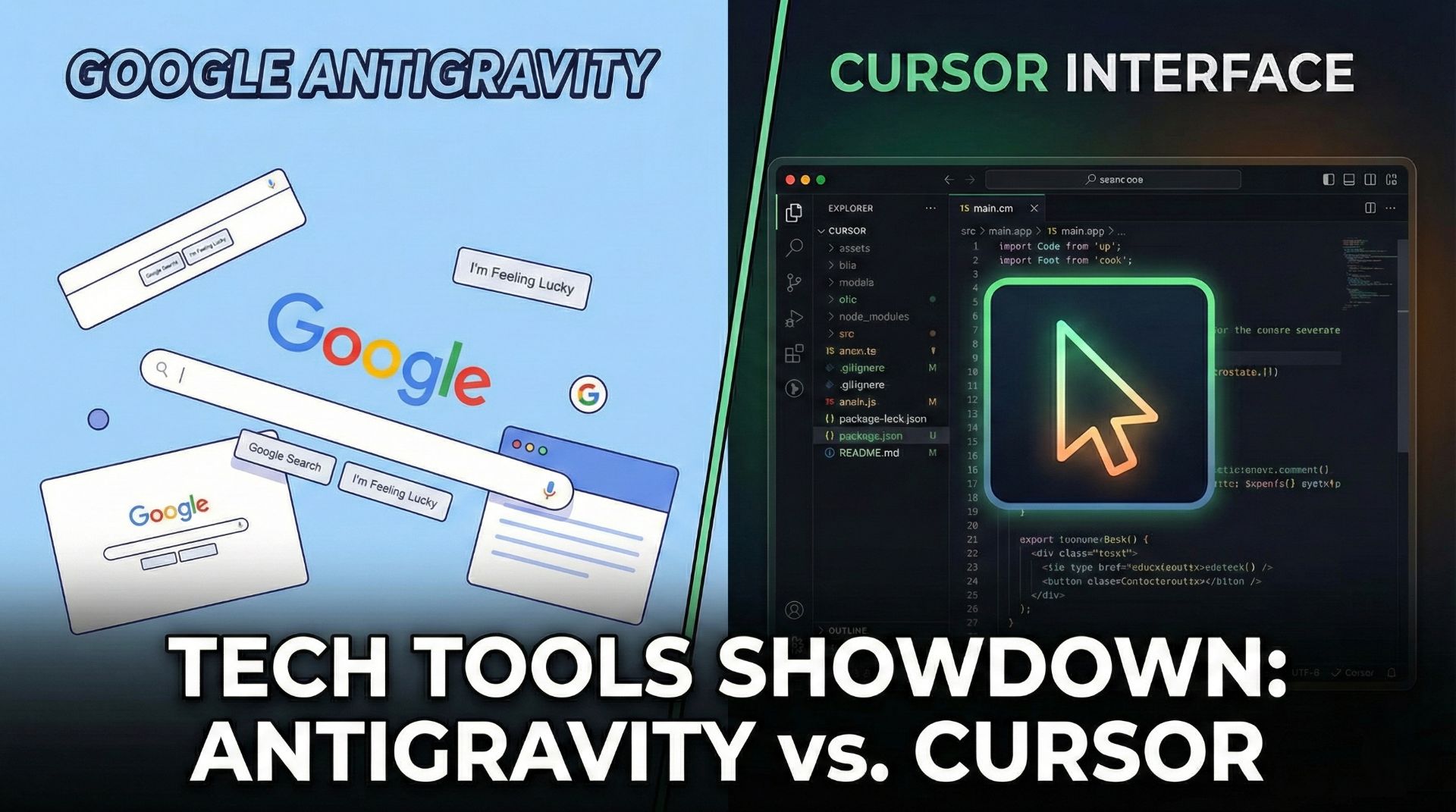
Google Antigravity vs Cursor: Is Google's "Agent-First" IDE the Cursor Killer We've Been Waiting For?
The AI-powered IDE battlefield just got a massive shake-up. On November 18, 2025, Google dropped Antigravity—a VS Code fork that inverts everything developers know about how AI should work in code editors. Instead of the AI being a helpful sidebar assistant, Antigravity flips the script: the AI agent becomes the primary interface, and you become the conductor orchestrating a symphony of autonomous agents.
Cursor has been the undisputed king since 2023, but Google's coming in hot with some genuinely novel ideas that might actually make developers rethink their workflow. Let's break down what makes Antigravity different, where it wins (and where it stumbles), and whether you should even consider jumping ship.
What Makes Antigravity Different: Agent Orchestration vs. AI Autocomplete
The core difference between Antigravity and Cursor isn't just marketing fluff—it's a fundamental architectural shift.
Cursor treats AI as an embedded copilot within a traditional IDE. You write code, you ask the AI for help, it suggests completions. It's fast, intuitive, and works great for developers who like being in control.
Antigravity is built on something called "agent orchestration." You describe what you want (the "vibe"), and the platform spawns multiple AI agents that work in parallel across three coordinated surfaces: an Agent Manager (mission control), a code editor, and an automated browser. It's less "help me write this function" and more "build me a feature end-to-end."
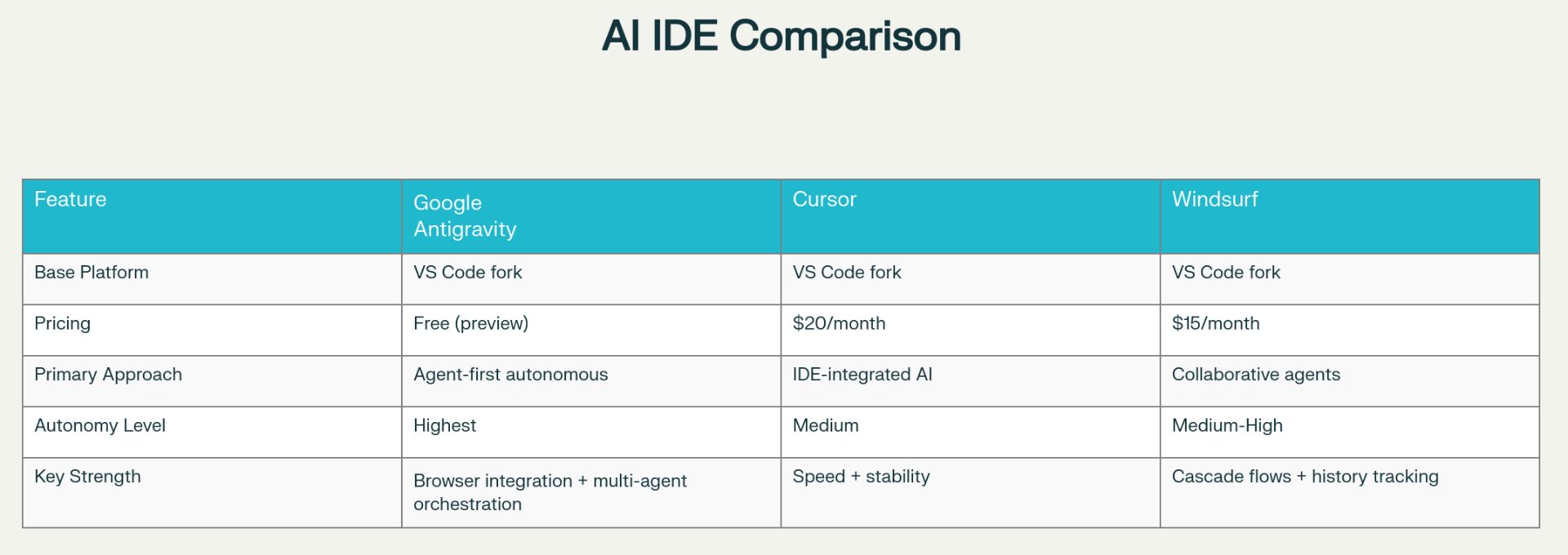
This architectural difference is massive. Imagine delegating a complex feature to an agent while it simultaneously writes backend code, frontend components, generates tests, and validates everything in a live browser—all without you touching the keyboard. That's what Antigravity promises. Cursor? It gets you there faster, but you're still doing the orchestration yourself.
The Benchmark Showdown: Gemini 3 Pro Takes the Crown (In Some Categories)
Google's been flexing hard with benchmarks, and honestly, the numbers back it up—mostly.
Gemini 3 Pro (the brain behind Antigravity) scores a 1487 Elo on WebDev Arena, making it the undisputed king of agentic web development. It absolutely crushes the Terminal-Bench 2.0 test with 54.2% vs. Claude's paltry 42.8%, proving it's exceptional at DevOps and terminal automation. And on tool use (t2-bench), it scores 85.4%—a 30.5 percentage point jump from Gemini 2.5 Pro.
But here's the plot twist: Claude Sonnet 4.5 still leads on traditional coding tasks with 77.2% on SWE-bench Verified, compared to Gemini 3's 76.2%. GPT-5.1 is virtually tied at 76.3%. It's close enough that the difference doesn't really matter for most developers.
Real talk: There's no single "best" model. Each excels in different domains. For full-stack web dev and DevOps? Gemini 3 Pro wins. For pure coding tasks? Claude edges it out by a hair. The beauty of Antigravity is that you're not locked into Gemini 3—you can also use Claude Sonnet 4.5 or GPT-OSS directly within the IDE if you prefer.
Vibe Coding: The Paradigm That's Actually Changing How We Build Software
"Vibe coding" isn't just a buzzword—it's the future of how software gets built, and Antigravity is leading the charge.
The term, coined by Andrej Karpathy in February 2025, describes a development approach where you "fully give in to the vibes" of an AI assistant and almost forget the code even exists. Instead of thinking in functions, loops, and data structures, you think in intent: "Create a customer dashboard with real-time analytics and a dark mode toggle."
The AI generates the code. You test it. You give feedback. It refines. Rinse and repeat.
Y Combinator reported that 25% of startups in its Winter 2025 batch had codebases that were 95% AI-generated. By July 2025, The Wall Street Journal documented vibe coding moving from experimental labs into production at major companies. This isn't some niche thing anymore—this is enterprise development in 2025.
Why does Antigravity matter for vibe coding? Because it has features specifically built for it:
Planning Mode: The agent generates a detailed implementation plan as a human-readable artifact before writing a single line of code. You can review the strategy, approve it, or tweak it. Then the agent executes.
Fast Mode: For quick fixes and small tasks, skip the plan and just go.
Artifacts System: Instead of dumping raw code into your files, Antigravity generates task lists, implementation plans, screenshots, and browser recordings. You see exactly what the agent did and why.
The artifact system is genuinely clever. It solves the trust problem that plagues autonomous AI. You're not just getting code; you're getting an audit trail showing the agent's reasoning.
Antigravity's Killer Feature: Multi-Agent Orchestration
The Agent Manager is where Antigravity truly sets itself apart. This is the "mission control" dashboard where you can orchestrate multiple agents working on different parts of your codebase simultaneously.
Imagine this real-world scenario: You're building a full-stack authentication system with JWT tokens, email verification, and rate limiting. With Antigravity, you don't tell one agent to do it all. Instead, you spin up three agents in parallel:
Agent 1 works on the backend API and database schema.
Agent 2 builds the frontend components and login flow.
Agent 3 generates tests and CI/CD pipelines.
All three work simultaneously, and the platform coordinates their work. When Agent 1 modifies the database schema, Agents 2 and 3 are aware of the change and adjust accordingly. The platform calls this "cross-surface agents"—they work across the editor, terminal, and browser at the same time.
One user reported that an agent processed a 340,000-line repository in 9 seconds, created 18 new files, modified 42 existing ones, wrote migrations and email worker setup, and had all 114 tests passing in under 2 minutes. Then it opened a browser, went through the entire login flow, and showed a screenshot of the working app.
That's not faster development—that's a completely different category of fast.
The Browser Integration: Watch Your App Build Itself in Real-Time
Unlike Cursor's embedded browser, Antigravity's browser automation is a whole different beast. It uses a sub-agent pattern—a dedicated "Jetski" sub-agent with its own system prompt and specialized toolset.
Here's how it works: The agent navigates your app, clicks buttons, fills forms, captures screenshots, and records everything as WebP video artifacts. It's not just simulating clicks; it's actually controlling a Chrome instance and inspecting the real DOM.
This matters because the agent can do actual end-to-end testing. It's not guessing whether your UI works—it knows because it just tested it. Early users report 70% reduction in API-related bugs through proactive validation.
Performance Comparison: Speed vs. Autonomy
Here's where it gets interesting. Cursor's Composer model completes typical tasks in roughly 30 seconds. Antigravity's Planning Mode takes longer upfront because it generates a detailed plan first, but once that's approved, the agent works faster and more reliably.
It's a classic trade-off: Cursor prioritizes speed. Antigravity prioritizes accuracy and traceability through planning. If you're a developer who wants the fastest possible iteration, Cursor wins. If you're a developer (or a team) that needs to understand what the AI did and why, Antigravity's artifacts are invaluable.
Speed-wise, they're in the same ballpark. Autonomy-wise, Antigravity goes way further—it can manage complex multi-file changes across your entire project without needing your input at each step.
The Security Elephant in the Room
Google launched Antigravity with a bang, but not all the headlines were positive. Within 24 hours of the public preview launch, security researchers discovered a critical vulnerability that allowed attackers to create system backdoors.
By modifying Antigravity's settings, a researcher was able to generate malicious code that created a backdoor on both Windows and Mac systems. The exploit required minimal social engineering—just convincing a user to click a "trusted" button.
Worse? Google confirmed awareness of at least two other vulnerabilities where malicious code could manipulate the AI to access files and extract sensitive information. As of late November, no patch had been issued, and according to security researchers, "there is no configuration we could pinpoint to protect against this vulnerability."
This is rough. Cursor has had time to harden its security. Antigravity is brand new, and it shows. Google's promising to fix these issues, but the message is clear: don't use Antigravity for production-critical work just yet.
Pricing: Free Today, But What About Tomorrow?
Here's the thing that sounds too good to be true: Antigravity is completely free during the preview phase. You get unlimited tab completions, unlimited command requests, and access to Gemini 3 Pro, Claude Sonnet 4.5, and GPT-OSS models. No credit card required.
But let's be realistic. Google's already signaled that pricing is coming. The pricing page lists "Individual plan $0/month," and industry observers are unanimous: this free tier won't last forever.
Google hasn't announced pricing yet, but based on how other AI services work, expect either:
Token-based billing: You pay per request or per token used.
Seat licensing: Per-developer pricing for teams and enterprises.
Tiered subscriptions: Free tier for individuals with light usage, paid tiers for teams and heavy users.
For now? It's free. Enjoy it while it lasts. By comparison, Cursor is $20/month for Pro, and Windsurf (another major competitor) is $15/month.
How Antigravity Stacks Up Against The Entire Landscape
Google's not just competing with Cursor. The AI IDE space is getting crowded.
Windsurf (by Codeium) offers Flows and Cascade systems for building complex workflows. It's genuinely impressive, but feels less "agent-orchestrated" and more "really smart workflow automation."
Zed (from the creators of Atom) is a lightweight, Rust-based editor that's blazingly fast and supports multiple AI models out of the box. It's not as feature-rich as Cursor or Antigravity, but it's gaining traction for developers who prioritize performance over bells and whistles.
GitHub Copilot is everywhere (literally—it's in VS Code, Visual Studio, JetBrains IDEs, etc.), but it's embedded autocomplete, not an IDE replacement. It's useful, but it's not competing in this space.
The landscape looks like this: Cursor owns speed and stability. Antigravity is pushing the boundaries of autonomous agents. Windsurf offers a middle ground with powerful workflows. Zed is for performance nerds. Pick your poison based on what matters to you.
The Real Question: Should You Switch?
Honestly? Not yet.
Antigravity is genuinely innovative, but it's brand new, has security vulnerabilities, and isn't battle-tested in production environments. The enterprise features (SOC 2 certification, SSO, audit logs) that teams need? They're not there yet. Cursor has all of this dialed in.
Use Antigravity if:
You're an individual developer experimenting with agent-first workflows.
You're working on side projects or prototypes.
You want to experience what the future of coding might look like.
You're willing to deal with rough edges and occasional crashes.
Stick with Cursor if:
You're using AI IDE in production, mission-critical work.
Your team needs enterprise security features and compliance certifications.
You want stability over cutting-edge features.
Speed is your top priority.
Try Windsurf if:
You like Cursor but want more workflow customization.
You want something between "traditional IDE" and "full agent orchestration."
What This Means for Software Development in 2025 and Beyond
The 2025 AI IDE landscape is wild. We've gone from "should I upgrade my VSCode theme?" to "do I even need to understand code anymore?" in three years.
The momentum is undeniable: 75% of major tech companies are exploring or actively using AI code generation. Vibe coding isn't experimental anymore—it's mainstream. Within two years, the developers who can't use AI tools effectively will be at a serious disadvantage.
Google's Antigravity represents the next evolution: from AI-as-assistant to AI-as-orchestrator. You're not asking for suggestions anymore; you're delegating entire feature development to autonomous agents. It's simultaneously exciting and slightly terrifying.
The browser automation alone is a game-changer. Most AI code generators produce code that compiles and runs. Antigravity produces code that works because it tested it in a real browser before handing it to you.
But here's the catch: all this power comes with responsibility. The vulnerabilities discovered in Antigravity's first week show that rushing out agent-first systems without proper security vetting is dangerous. As more developers use these tools, the attack surface grows.
The smart move: Keep an eye on Antigravity. Try it for side projects. But for production work, give it another 6-12 months to mature, for Google to patch the security issues, and for the enterprise features to land. By mid-2026, we might genuinely have a Cursor competitor that offers something fundamentally better.
Until then, Cursor remains the safe, proven choice. But the future? It's being built by Google right now, and it's called Antigravity.